AI agent security: how to let agents act without handing over the keys
Letting AI agents read your inbox, update your CRM or draft replies saves hours, but only if they can't do damage when something goes wrong. This guide covers AI agent security in plain terms: the risks that matter, the controls that work, and how we apply them in OS47.
What is AI agent security?
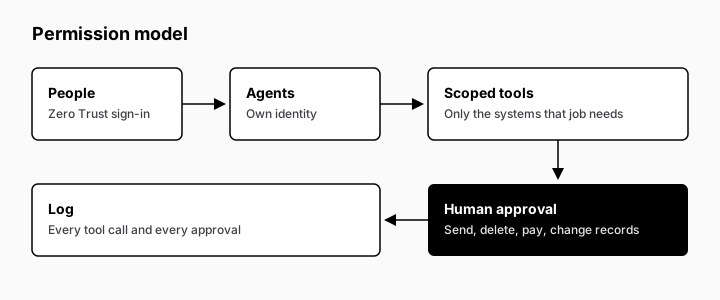
AI agent security is the set of controls that decide what an AI agent can see, what it can do, and who signs off before it acts on company systems. In practice it means four things: scoped access for each agent, human approval for actions with side effects, verified sign-in for people, and a log of every action.
The difference from ordinary software security is that an agent decides its own next step. A normal app does exactly what its code says. An agent reads an email, a document or a web page, decides what to do with it, and then calls a tool: it sends a reply, updates a record, moves a file. That makes its behaviour useful, and it also makes it harder to predict. Some of what the agent reads may have been written by someone who wants it to misbehave.
So securing AI agents is less about building a wall around them and more about drawing their limits:
- What can it see? Which mailbox, which folder, which records, and nothing beyond that.
- What can it do? Read only, draft only, or act, decided tool by tool.
- What needs a human yes? Anything that sends, deletes, pays or changes data other people rely on.
- What gets recorded? Every action, so you can see afterwards what happened and why.
None of this is exotic. It is the same least-privilege thinking your IT team already applies to staff accounts, applied to a new kind of worker. The OWASP Top 10 for LLM Applications (genai.owasp.org/llm-top-10) names the agent version of the problem Excessive Agency: giving a model-based system more functionality, more permissions or more autonomy than its job needs.
For a company owner or ops lead, the useful question is not "is this agent secure?" in the abstract. Ask instead: "if this agent were fooled tomorrow, what is the worst it could do, and would anyone notice?" Good AI agent security keeps that worst case small, and it makes sure someone would notice. The rest of this guide is about how to get there.
The risks that matter for a company
Most AI agent incidents in a company do not look like a film-style hack. They look like a helpful assistant doing the wrong thing with access it should never have had. These are the five risks worth planning for:
- Prompt injection. Instructions hidden in content the agent reads (an inbound email, a shared document, a web page) can push it to ignore its own rules. OWASP ranks it first in its Top 10 for LLM Applications, as LLM01:2025 (genai.owasp.org/llmrisk/llm01-prompt-injection). An agent that reads the outside world is exposed to this by design.
- Over-permissioned tools. An agent built to read the CRM is connected with an account that can also delete records. An agent that only needs one shared folder can see the whole drive. Each extra permission is a mistake waiting to happen, whether the cause is an attacker or a plain misunderstanding.
- Data leakage. Agents move information between systems. Without clear limits, a customer's details can end up in a reply to someone else, a summary can land in the wrong channel, or company documents can be sent to a model or service you never approved.
- Unintended actions. An email sent to the wrong list, a record overwritten, a refund issued twice. When an agent can act on its own and no one checks the actions that matter, small errors become external, and some cannot be undone.
- Runaway activity and spend. An agent stuck in a loop, or a workflow triggered far more often than planned, can burn through model usage and flood the systems it touches. If nobody set a limit, nobody finds out until the bill arrives.
These risks have one thing in common: the damage depends far more on what the agent is allowed to do than on how clever the model is. A fooled agent with read-only access to one folder is an annoyance. A fooled agent with write access to email, the CRM and payments is an incident.
That is why the controls in the next sections start with access and approvals, not with trying to make the model impossible to trick.
Start from zero access: least privilege per agent
The safest AI agent is one that can only reach what its job needs. Give access per agent, not per company: a support agent reads one shared mailbox and the help-desk tickets, a reporting agent gets read-only access to the CRM, and a sales agent drafts in one folder but cannot send. Good AI agent access control starts with a short list of systems each agent may touch, with read or write marked for every entry, and everything else stays closed by default.
When an agent needs more, widen its access on purpose, for a reason and with a date, and don't hand it a shared admin account. This is what bounded autonomy means in practice: the agent acts freely inside a fence you drew, and nowhere else.
Human approval for anything with side effects
Reading, summarising and drafting are low risk. Sending, deleting, paying, publishing and changing records are not. Put a person in front of every action that changes something outside the agent's own workspace. That is human-in-the-loop approval: the agent prepares the action, and a named person approves or rejects it.
Write the triggers down as escalation rules, for example: "any email to a new recipient", "any refund", "any change to a price". Clear rules keep approvals fast, because people only see what really needs them.
Zero Trust sign-in for people, scoped permissions for agents
People and agents need different controls. People sign in through a Zero Trust layer such as Cloudflare Access, so every request is checked against who they are and what they may open, with no VPN and no open admin panels. Agents don't sign in like people. They call tools, and each tool should expose only the actions that agent is allowed to take.
MCP servers are a common way to give agents tools. Treat each one as an API with its own permissions: separate credentials per agent, only the operations it needs, and secrets kept server-side, never in the prompt.
Defending against prompt injection
You cannot fully prevent prompt injection today. OWASP says so plainly: given how language models work, "it is unclear if there are fool-proof methods of prevention" (LLM01:2025 Prompt Injection). The UK National Cyber Security Centre goes further and warns that prompt injection "may never be totally mitigated" the way SQL injection can be (NCSC, "Prompt injection is not SQL injection (it may be worse)").
The practical answer is to assume an agent will one day read a hostile instruction, and to design so that obeying it achieves very little:
- Limit what a fooled agent can reach. An agent with read-only access to one mailbox cannot forward the whole company's email, whatever it is told. This is the biggest single defence, and it comes from the access rules above, not from the model.
- Hold side effects for a human. If sending, deleting, paying and changing records all wait for approval, an injected "send this to…" becomes a draft someone rejects, not an action.
- Treat outside content as data, not orders. Emails, attachments, web pages and tool results are material to work on. They are never a source of new instructions. Separate them clearly from the agent's own rules, and check the agent's output against those rules before anything leaves the system.
- Keep secrets out of reach. Don't put API keys, passwords or unrelated customer data in the agent's context. What the agent never sees, it cannot leak.
- Test with real attacks. Include injection attempts in the agent's test cases, and re-run them after every prompt, tool or model change.
For a deeper look at how the attacks work, with examples of direct and indirect injection, see our glossary entry on prompt injection. OWASP's LLM Prompt Injection Prevention Cheat Sheet is the more technical reference for developers.
The goal is not an agent that can never be tricked. It is an agent that, when tricked, has nowhere harmful to go.
Logs, audit trails and evals after every change
If an agent did something, you should be able to see what it did, when, on whose request, and who approved it. Log every tool call and every approval, and keep the logs where the team can search them. That's what turns "the AI did something strange" into a question you can answer.
Logs show what already happened. Evals catch problems before they reach users. After any change to prompts, tools or models, rerun a fixed set of test cases, including attempts to trick the agent. We use our 20-case eval checklist as a starting point.
A pre-launch AI agent security checklist
- Each agent has a written list of the systems it may access, read or write.
- No agent uses a shared or admin account.
- Every action with side effects needs human approval.
- Escalation rules are written down and owned by a named person.
- People reach agent tools only through Zero Trust sign-in.
- Tool credentials are per agent and stored server-side.
- Untrusted content (emails, web pages, files) cannot trigger actions on its own.
- Every tool call and approval is logged and searchable.
- Evals, including injection attempts, run after every change.
- Spend has a limit per agent or per team (how to cap agent spend).
Together these are your AI guardrails: the rules the agent can't step outside, whatever it's asked.
How theagency47 applies this in OS47
In the agents we build, and in OS47, where your team sees and approves their work, these controls are part of the setup from day one: people sign in through Zero Trust, each department agent has its own scoped tools, actions with side effects wait for approval, and every step is logged in theagency47's Cloudflare account or your own. For larger teams we also prepare the documentation for security and procurement review. The organisational side (who owns each agent, what it may do alone, who reviews its logs) is covered in our AI governance framework.
Book a discovery call: we map which systems your agents may touch, and which they may not.
AI agent security FAQ
What is the biggest security risk with AI agents?
Prompt injection combined with excessive permissions (OWASP LLM01 and LLM06). An agent that reads untrusted content and can also take actions is the riskiest combination.
Can prompt injection be fully prevented?
No. Current guidance treats it as a risk to contain, not one to eliminate: limit tools and data, require human approval for sensitive actions, and monitor behaviour.
What is human-in-the-loop for AI agents?
A rule that the agent must ask a person before certain actions, such as sending, paying or deleting. It turns a possible incident into a request someone can decline.
How do you control what an AI agent can access?
Give each agent its own identity and an allowlist of tools and data, enforced outside the model, for example with Cloudflare Access and per-agent API keys.
Should AI agents run on your own infrastructure?
Running agents in theagency47's Cloudflare account or your own, in a setup used by your business only, keeps data, logs and permissions under your control.